Equifax Payment Center
Quick Pay
Use our new Quick Pay feature to easily make a quick one-time payment.
[Not available for UK customers, at this time]
Log in to or Enroll in iReceivables
Securely view invoices, download csv details, and make payments at your convenience.
[Customers utilizing Midigator services should update their payment method through the Intellipay platform]
Frequently Asked Questions
iReceivables gives you self-service access to your own accounts’ invoice PDF's and invoice details with real-time balance and transaction information.
By allowing you to view invoice details and download a CSV file directly and securely, you can monitor your own invoice transactions when and how you want.
You can also pay your invoices, using either your bank account or credit/debit card. Please note that a surcharge may apply when paying with a credit card.
iReceivables gives you self-service access to your own accounts’ invoice PDF's and invoice details with real-time balance and transaction information.
By allowing you to view invoice details and download a CSV file directly and securely, you can monitor your own invoice transactions when and how you want.
You can also pay your invoices, using either your bank account or credit/debit card. Please note that a surcharge may apply when paying with a credit card.
iReceivables gives you self-service access to your own accounts’ invoice PDF's and invoice details with real-time balance and transaction information.
By allowing you to view invoice details and download a CSV file directly and securely, you can monitor your own invoice transactions when and how you want.
You can also pay your invoices, using either your bank account or credit/debit card. Please note that a surcharge may apply when paying with a credit card.
iReceivables gives you self-service access to your own accounts’ invoice PDF's and invoice details with real-time balance and transaction information.
By allowing you to view invoice details and download a CSV file directly and securely, you can monitor your own invoice transactions when and how you want.
You can also pay your invoices, using either your bank account or credit/debit card. Please note that a surcharge may apply when paying with a credit card.
If you forget your password, you can reset it using the following steps.
- From the login page, enter your username (registered email) and click the Continue button.
- Click on the Forgot password? link.
- Enter your registered email address and click the Continue button.
- A password reset email will be sent to you. Please be aware that the link in the email will expire in 1 hour. The email will be sent from noreply@equifax.com; you may need to check your spam folder.
NOTE: Equifax uses MFA (multi-factor authentication). If you have not activated your MFA account, you will need to do so in order to access the iReceivables portal. Look for the User Activation Email you should have received.
Equifax requires the use of complex passwords to keep your data secure and prevent unwanted access to your information. Please review the iReceivables user guide to find additional information regarding our complex password requirements.
Equifax takes great precautions to safeguard your personal information and online financial transactions.
Measures that we take include:
- Password and security protection: You will be asked to log in to the secure section of our website with a password that you create. We also authenticate you through several methods.
- Electronic encryption: Your account and financial information are stored in a secure encryption environment. All online transactions are handled from a secure server and encrypted for transmission.
- Limited access and procedural safeguards: Access to all customer account information is restricted solely to the account holder who has registered and provided a username and password.
Automatic Payment & Credential Storage Policy
Last Revised: March 9, 2026
Purpose & Scope
This policy governs the setup, maintenance, and storage of payment credentials for clients (Client or You) of Equifax Inc. and its affiliates (collectively, Equifax). It provides a convenient, automated billing experience (“Autopay”) while helping protect the security of sensitive financial data.
Autopay Enrollment Options
Voluntary Enrollment: You may elect to enroll in Autopay for recurring service fees, subscriptions, or invoices.
Mandatory Enrollment: Clients with a selection of “Autopay” within your Equifax Services Agreement are part of the “Mandatory Enrollment” groups and are required to maintain a valid, authorized payment method on file and remain enrolled in Autopay as a condition of service.
Authorization for Recurring Charges
By enrolling in Autopay, You authorize Equifax and its service providers to:
Store the provided payment credentials (credit card, debit card or bank account via ACH/ electronic check) securely via token in the Equifax payment system.
Charge the stored payment method for the full balance due on either the payment due date (which typically consists of a thirty (30) day period unless otherwise set forth in your Equifax services agreement) or selected payment date, whichever comes first. You understand that the amount charged may vary based on actual usage, service plan, overage, price increase, or applicable taxes.
Credential Security & Retention
Storage: Payment data is stored using tokenization or strong encryption. Equifax and its service providers do not store full CVV codes or raw card numbers on local servers.
Updates: You are responsible for maintaining updated and valid payment information. Failed transactions due to expired credentials may result in service interruption, late fees or possible cancellation.
Change in Payment Method. You may update your Autopay payment method at any time through the Online Account Portal. If You update the payment information, You authorize us to charge the new payment method for all future recurring payments. Changes to payment method may take up to 3 days to complete and may not be used for the current payment if the due date is prior to the effectiveness of payment method change.
Card Account Updater Service and Authorization. Equifax participates in the Visa Account Updater (VAU) and Mastercard Automatic Billing Care (ABC) programs. By maintaining your automatic payment setup, you authorize us to continue charging the updated card to help prevent service interruptions.
Failed Transactions & Secondary Methods. If an automatic payment is declined for any reason (including expiration or insufficient funds), we will attempt to contact you via the email or other contact methods on file. We reserve the right to re-attempt the charge. You are responsible for any late fees, service disruptions or any other related charges resulting from a failed payment.
Cancellation & Revocation
Right to Revoke: This authorization remains in effect until You cancel it. You may cancel your Autopay authorization at any time through the iReceivables portal. Please refer to our Invoice and Payment Webpage for access to the portal and our user guide. See Cancellation Policy FAQ below.
Mandatory Enrollment: For clients in Mandatory Enrollment groups, revoking Autopay authorization without providing an alternative authorized method may result in service termination. See Cancellation Policy FAQ below.
Contact with Equifax can be managed through any one of the following: Via Mail at Equifax Inc. 1550 Peachtree Street, N.W. Atlanta, GA 30309, Via Email, Contact Us Link or Phone 1-888-Equifax
Last Revised: March 9, 2026
General Refund Eligibility
Refunds for automatic payments are granted only in instances of billing errors, overpayments, or where services were not rendered as contracted. Once an automatic payment is successfully processed, the transaction is considered final unless a formal refund request is submitted via the Company Billing Portal or through Customer Support.
Method of Reimbursement
Refunds will be credited back to the original method used for the automatic payment, in accordance with payment network rules. Equifax Inc. and its affiliates (collectively, Equifax) will not issue refunds via cash, check, or transfer to an alternative card or bank account to help prevent fraudulent activity and comply with Anti-Money Laundering (AML) standards. If the original payment method is unavailable, Equifax may process the refund using an alternative method as permitted by applicable regulations and network requirements.
Processing Timelines
Approved refunds are typically initiated within 3-5 business days. However, the actual reflection of funds in your account depends on your financial institution's processing times. You should allow 7-10 business days for the credit to appear on your statement. Equifax is not responsible for any overdraft, interest fees, or any other related charges incurred during the processing period.
Cancellation vs. Refund
Canceling an 'Autopay' prevents future charges but does not automatically trigger a refund for payments already processed. If you cancel your authorization after a billing cycle has been initiated, the current charge remains valid unless it otherwise meets the eligibility criteria defined in General Refund Eligibility.
Chargeback Policy Warning
By enrolling in automatic payments, you agree to contact Equifax to resolve any billing discrepancies before initiating a chargeback or reversal through your financial institution. This request does not waive or limit any legal rights you may have to dispute charges with your payment provider. However, chargebacks or reversals submitted in bad faith, based on materially false information, or otherwise determined to be 'friendly fraud,' may result in immediate suspension or termination of your account. Any amounts finally determined to be owed after dispute resolution may be referred to a third-party collection agency.
Contact
Contact with Equifax can be managed through any one of the following: Via Mail at Equifax Inc. 1550 Peachtree Street, N.W. Atlanta, GA 30309, Via Email, Contact Us Link or Phone 1-888-Equifax
Last Revised: March 9, 2026
Right to Cancel & Revocation
You may cancel your enrollment in Equifax and its affiliates (collectively, Equifax) automatic payment program (Autopay) at any time through the iReceivables portal. Please refer to our Invoice and Payment Webpage for access to the portal and our user guide. To prevent the next scheduled charge, your cancellation request must be received through your Online Account Portal at least 3 business days before your next scheduled payment date. In the event that you have “Autopay Required” within your Equifax services agreement, you are set up for Mandatory Enrollment. Clients with Mandatory Enrollment are required to maintain a valid, authorized payment method on file and remain enrolled in Autopay as a condition of service. Please see your Equifax services agreement for details.
Final Payment & Account Closure
Cancellation of your automatic payment authorization does not cancel your underlying contract for services or any outstanding balance due. Upon termination of this authorization, all remaining balances must be paid via an alternative method (e.g., check, ACH or manual card entry) by the original invoice due date. For clients in Mandatory Enrollment groups, revoking “Autopay” authorization without providing an alternative authorized payment method may result in service termination.
U.S. Credit Card Surcharge - In Effect September 2025
A 2.7% surcharge will be assessed by Equifax on all payments made by U.S. customers using a credit card through this payment channel, unless restricted by law. This fee will not apply to debit card transactions. This surcharge does not exceed Equifax's cost of acceptance.
For Colorado Card Holders only: To cover the cost of processing a credit or charge card transaction, and pursuant to section 5-2-212, Colorado Revised Statutes, a seller or lessor may impose a processing surcharge in an amount not to exceed the merchant discount fee that the seller or lessor incurs in processing the sales or lease transaction. A seller or lessor shall not impose a processing surcharge on payments made by use of cash, a check, or a debit card or redemption of a gift card.
General Compliance & Authorization
By providing your banking information, you authorize Equifax Inc., its affiliates and their respective service providers to initiate debit entries to the specified account for any amounts you owe to us, pursuant to any agreements you have with Equifax, until this authorization is revoked. You acknowledge that all originating ACH transactions must comply with U.S. law and the current Nacha Operating Rules. You certify that you are an authorized user of this account and are the only person required to authorize debits from the account. You further agree you will not dispute these scheduled transactions with your financial institution so long as they correspond to the terms indicated in this authorization.
Fraud Monitoring & Risk-Based Processes
In accordance with ACH Rules, Equifax implements risk-based processes and procedures to help identify potentially fraudulent transactions, including those initiated under 'False Pretenses' such as business email compromise or vendor impersonation. We reserve the right to delay or decline any transaction that exhibits anomalous activity or fails our internal fraud-detection protocols.
Correction of Errors & Reversals
If an error occurs in the administration of your ACH payment, you authorize Equifax to initiate credit or debit entries to your account for the purpose of correcting such error(s). Any reversal or adjustment will be conducted in accordance with Nacha guidelines.
Fees & Liabilities
You are responsible for any penalties, fees or charges incurred from your financial institution for insufficient funds (NSF) or returned items. Equifax may, at its discretion, re-attempt a failed transaction. We are not liable for any losses or delays caused by incorrect or incomplete information provided by you.
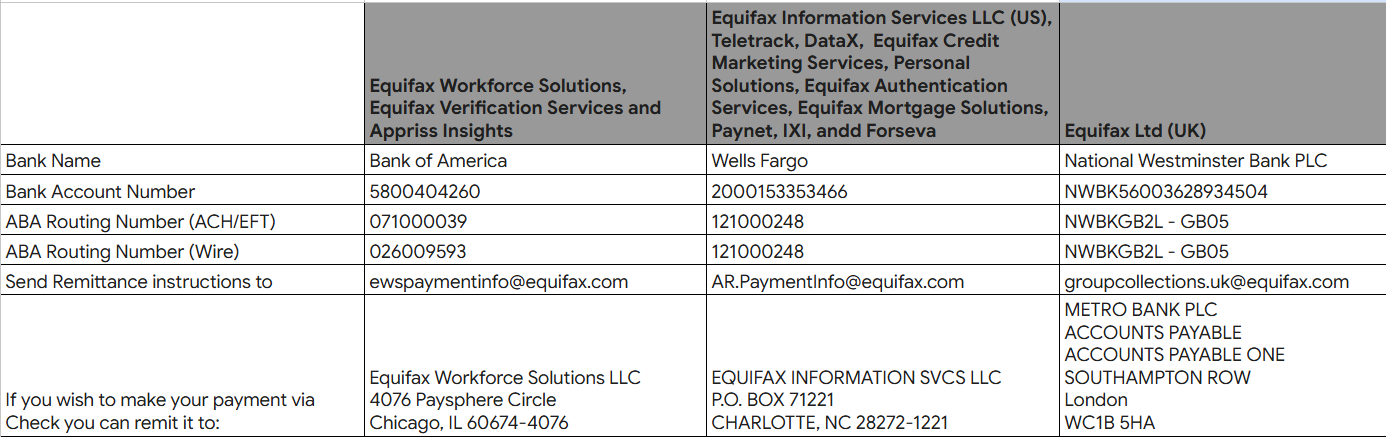
Once you are enrolled in the iReceivables portal, you can upload your tax exemption certificate there. Here is the link to the instructions for uploading your certificate: https://go.equifax.com/How-to-Upload
Here are the suggested actions the user can take to resolve this issue.
- Clear cache and cookies in the browser - this should resolve the issue for most users
- Switch to a different browser
- Try opening a private window using Incognito
- Ensure you do not have more than 1 window open and logged into iREC
- For payments, consider using QuickPay
For Google Chrome users,
- At the top right of your browser screen, click the three dots
- Choose Settings and click on the Security and Privacy
- Select Clear browsing data
- Check all the buttons to clear the browsing data under Basic and Advanced tabs (Browsing history, Download history, Cookies and other site data and Cached images and files, etc.)
- Be sure to select "All Time" from the Time Range dropdown list
- Click the "Clear data" button